Real-time quality scoring for underground utility locates. Know before you leave the field whether your data is relocatable.
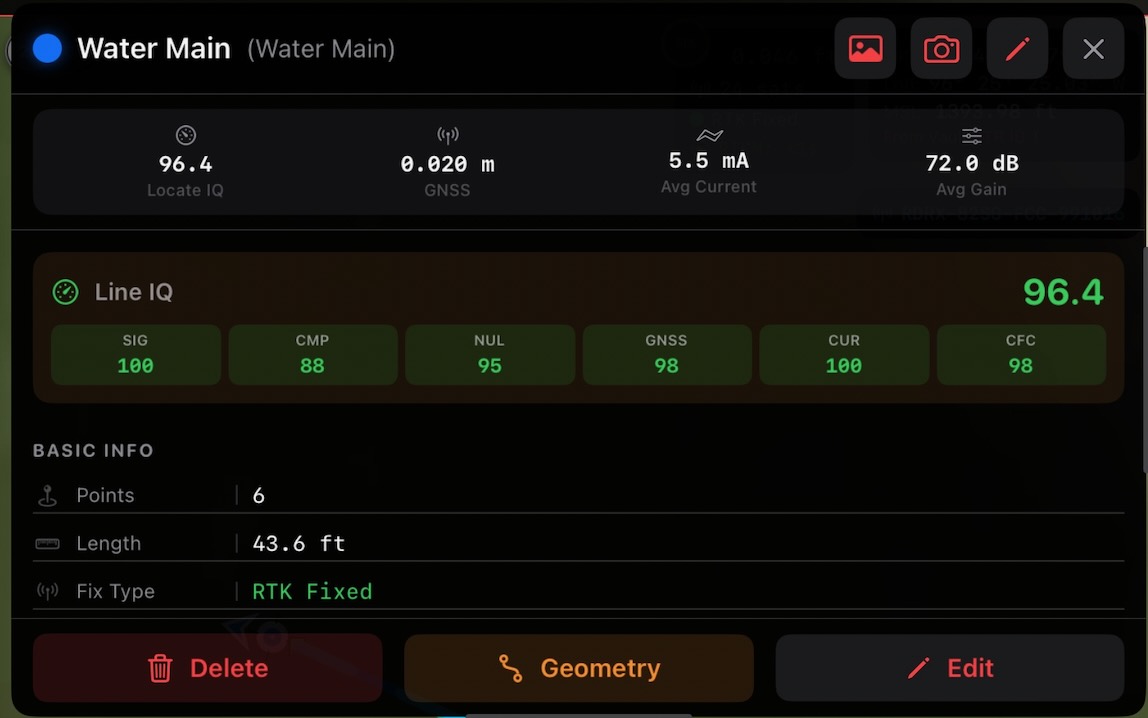
A line's score aggregates every point's IQ rating into a single number — with the per-component breakdown (signal, compass, null, GNSS, current, CFC) right there in the field, so you can stand by every locate before you leave the job.
LocateIQ is an iOS field data collection app built for underground utility locating professionals. It connects directly to electromagnetic (EM) locate receivers and high-precision GNSS equipment, captures every data point in real time, and scores the quality of each locate.
Every point you collect gets a Locate IQ Score (0–100+) that answers the question every locator and project manager needs answered:
"If someone comes back with a GPS receiver, can they find this utility again?"
LocateIQ publishes directly to ArcGIS Online or ArcGIS Enterprise — no CSV exports, no manual uploads. Your field data appears on your organization's web maps in real time with full symbology, scoring, and attribution.
Underground utility locating produces two categories of data that determine relocatability: EMF field quality (are we actually over the utility?) and GNSS quality (can we get back to this spot?). LocateIQ scores both, then combines them into a single actionable number.
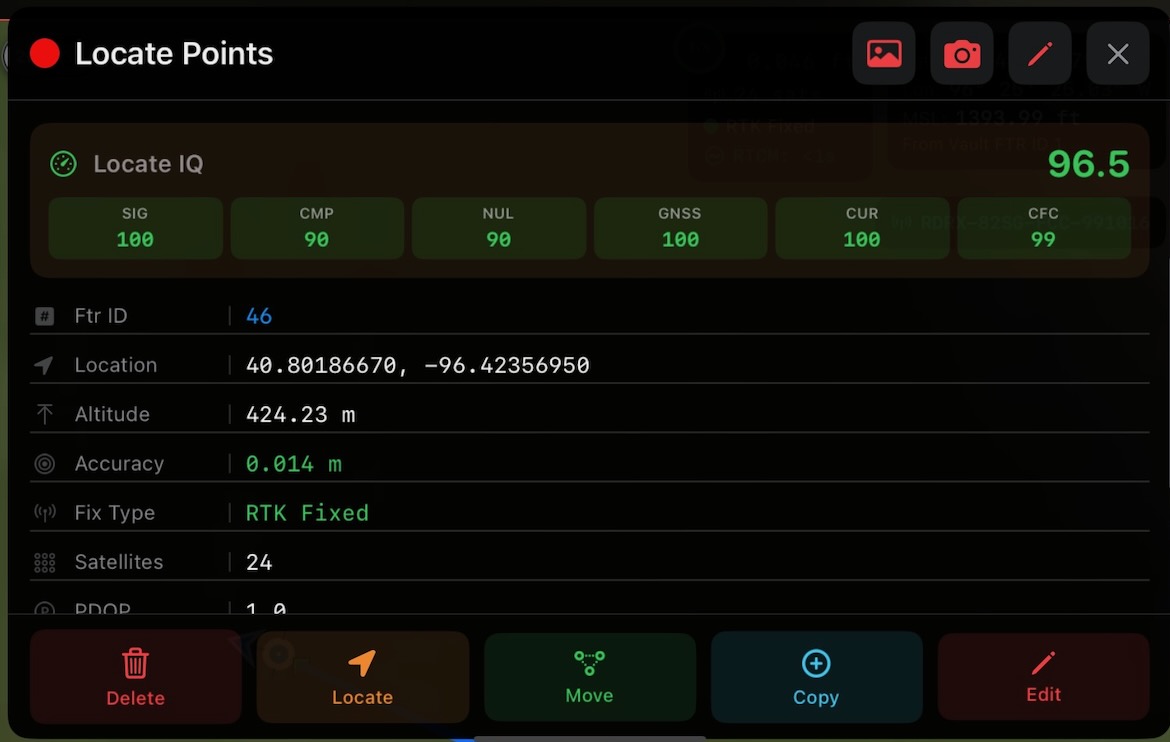
Tap any point in your project to see the live breakdown: signal, compass, null, GNSS, current draw, and CFC consistency — each scored independently and rolled up into the headline Locate IQ value. The example here shows a point scoring 96.5 on RTK Fixed at 0.014 m horizontal accuracy with 24 satellites.
EM locate receivers measure the electromagnetic field generated by current flowing through a buried conductor. LocateIQ captures and scores four aspects of that field:
Is the receiver getting a usable signal? Too weak means the utility is deep or poorly energized. Pegged at 100% means the receiver is saturated. LocateIQ rewards the sweet spot and penalizes both extremes.
The null indicator shows whether the receiver is centered directly over the conductor. Zero deflection = directly overhead. LocateIQ scores how tightly centered each reading is.
The compass indicates alignment with current flow. When it reads 0° or 180°, the receiver is aligned with the conductor. Deviation means you may be picking up interference or a parallel utility.
LocateIQ builds a current model along the entire line using every reading as an anchor. It compares actual vs. expected current. Consistent current means you're following one continuous conductor.
Even a perfect EM locate is useless for relocation if the GPS coordinates are poor. LocateIQ scores three GNSS factors:
Points captured at a surveyed above-ground marker (AGM) carry a known reference position, anchoring the locate to ground truth.
RTK Fixed is best (centimeter accuracy), followed by RTK Float, DGPS, and standalone GPS. No fix = no score.
The reported accuracy from the GNSS receiver, scored from sub-centimeter (excellent) to >5 meters (unusable for relocation).
The Consistency Field Check evaluates the shape and behavior of the EMF field at every point against the physics a clean buried conductor should produce. A circular-field model checks whether the field is symmetric and well-formed; departures from that shape are flagged as bleed-off, coupling, or distortion from a nearby utility or interference.
When the field looks the way it should, you have independent confirmation that the signal you're tracking is the one you're actually locating — not a ghost from a parallel line or a coupled conductor next door.
Each point's Locate IQ Score is the weighted average of all available component scores (0–100). At the line level, scores are averaged across all points, with bonus points for AGM (Above Ground Marker) calibration and attached photos.
Locate IQ scores read like a school grading scale — A through F — so anyone on the team can size up a locate at a glance.
Scores update in real time as points are added or removed. Order-dependent metrics (current slope, estimated depth, CFC) are recalculated dynamically using geometric line ordering. Line IQ = weighted average of all point scores + AGM bonus (10 pts per AGM, 5 pts per AGM with photo).
LocateIQ publishes directly to ArcGIS Online or ArcGIS Enterprise using your organization's existing portal. No middleware, no staging servers — field data goes straight to your web maps.
Users authenticate through their organization's ArcGIS login page with full PKCE protection. LocateIQ never sees or stores passwords — only short-lived tokens managed through your portal. Works out of the box with any ArcGIS Online organization.
Organizations that need tighter control can register a custom OAuth 2.0 Client ID and portal URL. The app only requires minimal permissions from your ArcGIS OAuth setup:
No admin-level scopes, no access to other users' content, no background data collection. The app requests only what it needs to authenticate and sync field data.
LocateIQ respects your ArcGIS role assignments. Editors can create and sync features. Viewers can see shared web maps but cannot modify data. Publishers can create new feature services with Create Custom Map. Your GIS administrator controls who can publish, edit, or view — LocateIQ enforces those permissions automatically.
Feature services are configured with per-layer editing capabilities. Locate point and line layers are editable for field crews. Reference layers (parcels, existing infrastructure, basemap overlays) can be included as read-only so crews see context without risking accidental edits.
Build ArcGIS feature services directly from the app with pre-configured schemas for water, gas, electric, telecom, sewer, and general utility layers. Each layer includes industry-standard symbology, coded value domains, and the full LocateIQ scoring attribute set.
LocateIQ supports any ArcGIS Online organization or ArcGIS Enterprise portal with OAuth 2.0 enabled. Configuration is managed per-company through the LocateIQ admin dashboard — no app-level changes needed for new deployments.
RTK corrections require NTRIP credentials (caster address, port, mountpoint, username, password). Instead of configuring each device manually, LocateIQ manages NTRIP credentials centrally in the cloud and pushes them to field devices automatically.
Administrators configure NTRIP caster details per company or per user through the LocateIQ dashboard. Credentials are stored securely in the cloud and never exposed in plaintext.
When a user signs in, the app pulls their assigned NTRIP configuration automatically. No manual setup, no sharing credentials over email or text.
NTRIP passwords are stored in the iOS Keychain on-device — not in preferences or logs. Credentials are rotated or revoked centrally without touching individual devices.
LocateIQ is built for enterprise environments where field data is sensitive and regulatory compliance matters. Security is not an add-on — it's built into every layer of the app.
LocateIQ's security controls map to common compliance frameworks. For detailed SOC 2 / ISO 27001 control mapping, contact us for our security documentation package.
| Control Area | Implementation |
|---|---|
| Encryption at rest | SQLCipher AES-256, iOS Keychain |
| Encryption in transit | HTTPS/TLS, PKCE |
| Authentication | ArcGIS OAuth 2.0 + PKCE |
| Session management | Configurable lock timeout + PIN |
| Access control | ArcGIS user/org scoping |
| Data retention | Soft delete with 30-day purge |
| Audit trail | Deleted features retained on ArcGIS |
| Credential storage | iOS Keychain (hardware-encrypted) |
Bring precision scoring, enterprise security, and ArcGIS integration to your field teams.